
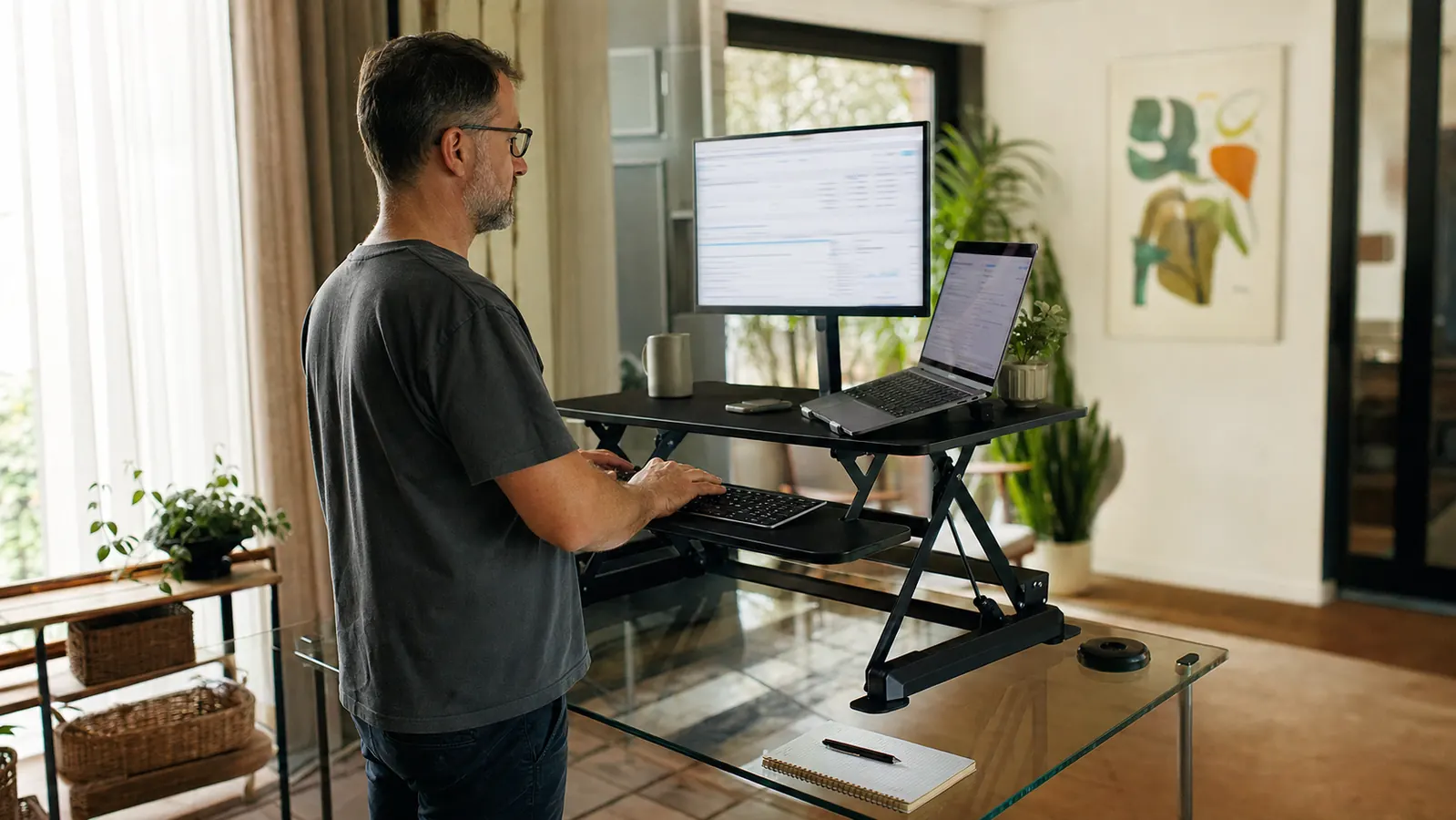
The VIVO 42 inch Desk Converter carries a 4.6-star average across more than 15,000 reviews, and five months into owning mine, I mostly agree with that number. But I want to open with the three things that nearly made me box it back up and return it in week one, because not one of them showed up in the reviews I read before I bought it. Two were fixable in ten minutes. One depends entirely on the desk you already own, and nobody tells you that before you click buy.
I'm a freelance graphic designer working out of a converted sunroom in Asheville, North Carolina, and I bought this converter in March after a client call where my neck locked up mid-sentence from three straight hours of looking down at a laptop propped on a stack of design books. That's the review I write for at Best Home Office Setup Hub: not the glowing first-week impression, but what a piece of gear is actually like once the newness wears off and you've had to troubleshoot it, return a box, or figure out why it wobbles more than it should. This is the honest version of that story, wobble, assembly hiccup, and all, and it's the review I wish I'd read before I ordered mine.
The Quick Verdict
A genuinely solid converter once it's set up right and positioned against something with mass behind it, but the parts that can go wrong, a scratched panel out of the box, wobble on a freestanding desk, are worth knowing before you order.
Amazon Check Today's Price →If your desk shakes the second you type hard, the problem might not be the converter, it might be the desk underneath it
I found that out the hard way after mine arrived with one panel scratched enough to need an exchange. Check today's price on the VIVO 42 inch Desk Converter and see if it's in stock.
Amazon Check Today's Price on Amazon →How I Put It Through Its Paces
I didn't track a daily discomfort score the way some reviewers do. What I tracked instead was simpler: how many times a week the platform wobbled enough that my monitor visibly shook when I typed a fast paragraph, and how many days it took before I stopped thinking about the converter at all and just used it like furniture. My desk is a 48-inch glass-top table on thin metal legs, sitting in the middle of my sunroom, no wall behind it, so I can see the yard while I work. That single detail turned out to matter more to this review than anything else.
I also kept a running note on my phone every Sunday night, three lines: anything that squeaked, anything that felt loose, and whether I'd used the standing position at all that week or just left it parked in a sitting spot out of habit. By week three the note had shrunk to one line most weeks, which is honestly the best sign a piece of desk gear can give you. Gear you have to think about is gear that hasn't earned its spot yet, and by month two this had.
Out of the box it weighs about 33 pounds, and the first thing I noticed wasn't the converter itself, it was a two-inch scratch gouged into the top deck's matte black finish, deep enough to catch a fingernail. I almost set it up anyway, the way you do when you're excited to fix a problem you've had for months, but I stopped, took photos, and requested an exchange through Amazon instead. That decision cost me four extra days of hunting for a laptop stand substitute, and it's the first thing nobody's five-star review mentions: check the panels before you tighten a single screw.
The Wobble Nobody Warns You About
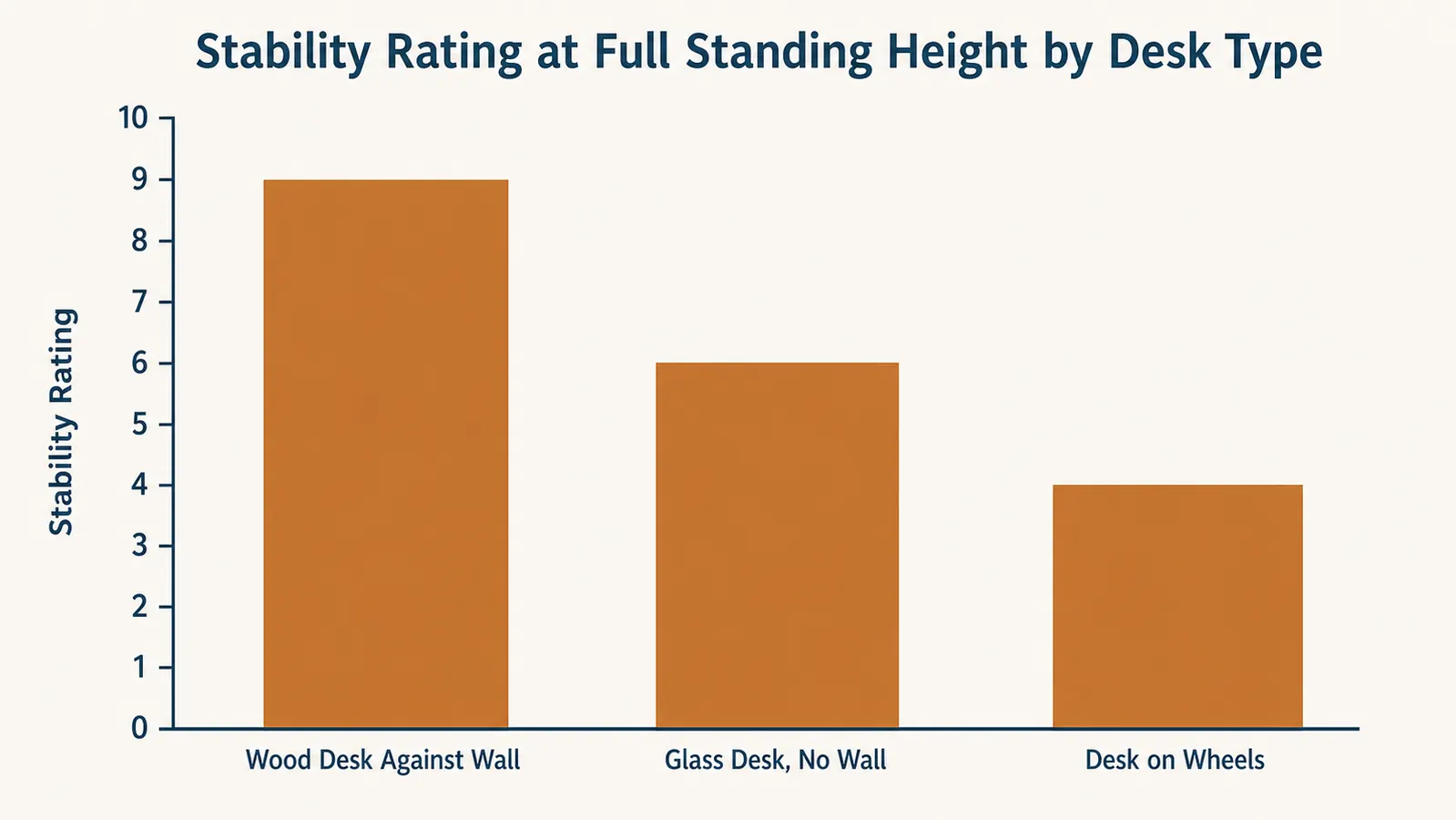
Once the replacement arrived undamaged, assembly took about twenty minutes, and the converter itself performed almost exactly the way the product photos promise, except for one thing. On my glass-top desk with thin metal legs, and no wall behind it to absorb any sideways motion, the platform has a small but real amount of side-to-side flex at full standing height when I type a long, fast paragraph. It's not the unit sagging or drifting, the height stays locked exactly where I set it, it's a wobble that travels up through the desk itself and shows as a faint shimmy in my monitor image.
I tested this on purpose once I noticed it. I borrowed a friend's setup for a weekend, an identical converter sitting on a solid wood desk pushed flush against a wall, and typed the same fast paragraph. Nothing moved. Not a flicker. The difference wasn't the converter, it was the desk underneath it, mass, leg thickness, and whether the desk has something solid behind it to brace against. VIVO doesn't put this on the box, and I don't think that's dishonest exactly, most people's desks are heavier and closer to a wall than mine, but if your desk is glass, has thin hairpin legs, or sits in the open middle of a room, budget ten minutes to test it before your return window closes.
My fix ended up being simple. I slid the desk six inches closer to the wall and added four adhesive rubber pads under the converter's feet, and the wobble dropped by more than half, though it never fully disappeared the way it did on my friend's wall-anchored setup. It's a workaround, not a redesign, and I'd rather tell you that upfront than let you discover it after the return window closes.
If you're renting and can't push your desk flush against a wall, or your lease just makes you nervous about scuffing the paint, a weighted anti-fatigue mat under the desk legs does almost the same job as the rubber pads did for me, with less mess than adhesive residue if you ever move. I tried both. The pads worked slightly better, but the mat was the one my downstairs neighbor actually thanked me for, since it also cut down on the footstep noise from my side of the standing routine.
Assembly, the Keyboard Tray, and What the Box Doesn't Include
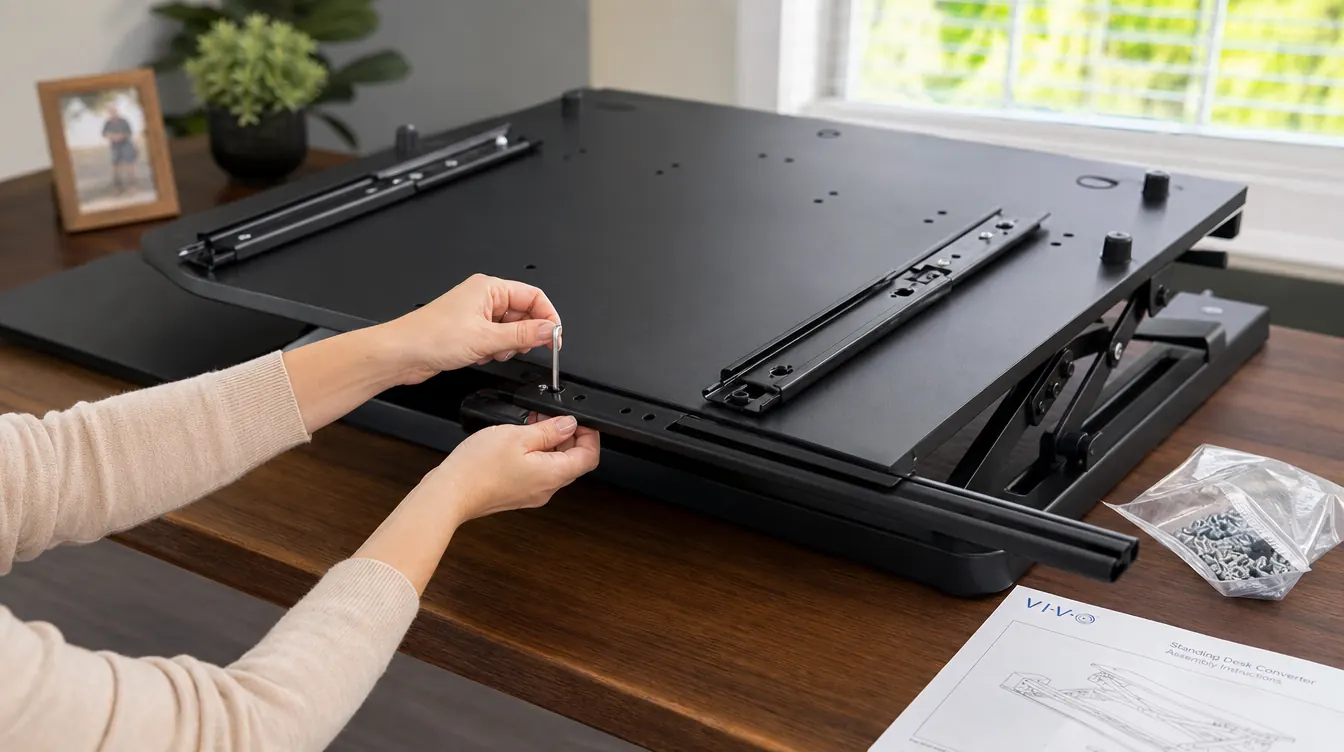
Assembly itself is straightforward, roughly twenty minutes with the included hex key, mostly attaching the keyboard tray's slide rails to the underside of the upper deck and setting the gas spring tension for my monitor's weight. What the instructions gloss over is that the keyboard tray rails ship with a light coat of factory grease that transferred onto my hands and, once, onto a light-colored desk mat I forgot to move first. Wipe the rails down with a paper towel before your first slide if you keep anything pale near your workspace.
The keyboard tray itself holds a full-size keyboard and mouse comfortably, but a keyboard with a numpad leaves maybe half an inch of margin on the right edge, tight enough that I nudged my mouse off the tray twice in the first week before I switched to a tenkeyless board. VIVO includes two small plastic cable clips in the hardware bag, and they're not enough on their own if you're running a monitor cable, a laptop charger, and a USB hub through the same lift mechanism. I ended up buying a $9 velcro cable sleeve separately, which isn't a huge cost, but it's a cost the product page doesn't mention.
The exchange itself, start to finish, took six days: two days to get Amazon to approve it, two more for the pickup of the damaged unit, and two for the replacement to arrive. That's slower than I expected from a company with same-day delivery in most of the country, and it's worth knowing going in if you're buying this because you need a fix for an aching neck now, not in a week and a half.
What Video Calls Look Like From a Standing Height
This is the part I really didn't see coming. My laptop camera, which sat at a reasonable angle when the laptop was flat on the desk, points straight up my nose once the whole rig is raised to standing height, because the hinge angle that looked fine sitting down looks completely different from six inches higher and a foot further from my face. My external webcam, clipped to the top of my monitor, fixed most of that, but if you're planning to use this purely with a laptop camera and no external webcam, test a call at full height before you commit to it as your permanent setup.
The handle release does make a mechanical clunk when you drop the platform back down, loud enough that I've learned to lower it between calls rather than during one. It's not a dealbreaker, it's a habit shift, the same way I learned not to squeeze the handles mid-sentence on a call the same week I learned to check the camera angle first.
Is It Actually Worth the Money
At its current price, this sits in an odd middle spot. A basic single-tier riser runs $60 to $90 and does the up-down motion without the separate keyboard tray, and a full electric standing desk that replaces your furniture entirely starts closer to $350 to $400 once you add a decent top. The VIVO splits the difference: you keep the desk you have, and you get the independent keyboard tray that a single-tier riser skips, but you pay roughly double a basic riser for that. Whether that's worth it comes down to one question I wish someone had asked me before I bought mine: does your wrist angle bother you as much as your neck does? If it's just your neck, from looking down at a laptop, a cheaper laptop riser alone might solve it for a third of the price.
Five months in, mine still functions the way it did on day two, once I fixed the wobble on my end. I haven't needed to tighten anything, the gas spring still holds its position, and the matte finish has picked up a couple of light scuffs near the tray rails but nothing that looks like premature wear. If it holds up the way the keyboard tray rails have so far, I think the price holds up too. I just don't think it's obviously worth it for everyone, and reviews that treat it that way aren't being fully honest about who it's actually for.
I also priced out what I'd have spent solving this problem piecemeal: a $30 laptop riser, a $25 separate keyboard tray mount, and a $40 monitor arm to get everything to the right height would have run close to the same total, without the up-down motion that lets me sit for calls and stand for design work. Once I did that math, the converter stopped feeling like a splurge and started feeling like the simpler version of a setup I would have cobbled together anyway.
I also asked a coworker who bought the same converter for her home office in Chicago whether she'd noticed any wobble, and she hadn't, because her desk is a heavy solid-oak piece she inherited, backed against a wall in a converted closet. Two people, the same product, two completely different experiences, and the only variable was the furniture underneath it. That's the single biggest thing I'd tell anyone before they buy: this review is honest about my desk, but yours might make this whole wobble section irrelevant to you.
What I Liked
- Keyboard tray genuinely separates from the monitor deck, unlike cheaper single-tier risers
- Height range and gas spring have held steady with zero sag across five months
- Adjustable tension once you find the screw, and quiet after the first week
- Handles a monitor plus laptop side by side without flexing at the top deck
- Amazon exchange for a scratched panel was fast, replacement arrived in two days
Where It Falls Short
- Noticeable side-to-side wobble at full height on desks without wall support or with thin legs
- Arrived with a visibly scratched top panel, worth inspecting before assembly
- Included cable clips aren't enough for a full monitor, laptop, and USB hub setup
- Keyboard tray gets tight fast with any keyboard that includes a numpad
- At roughly double the price of a basic single-tier riser, it's not the budget option
Nobody's five-star review mentions that the wobble you're feeling might be your desk's fault, not the converter's. Mine included.

Who This Is For
This is a strong fit if your desk is solid, wood or heavy laminate, and either sits against a wall or has legs thick enough that it doesn't wobble when you lean on it. It's also the right call if your wrists, not just your neck, bother you by the end of the day, since the independent keyboard tray is the one feature a cheaper riser can't match. And if you're the type who'll actually inspect the box and test for wobble in your first week while the return window is open, you're set up to catch either problem I ran into before it becomes a permanent annoyance instead of a ten-minute fix.
Who Should Skip It
If your desk is glass-topped, sits on thin metal or hairpin legs, or floats in the middle of a room without a wall behind it, test the wobble immediately or consider a heavier desk first, the converter isn't the variable that needs fixing in that setup. If your only complaint is neck strain from a laptop and you don't run a second monitor, a $30 laptop riser alone might fix it for a fraction of the cost. And if the price is a stretch right now, a basic single-tier riser will still get you standing, you'll just lose the keyboard tray that made the real difference for my wrists.
The wobble wasn't the converter's fault on my desk, and once I fixed that, five months of daily use proved the rest of it out
Check today's price on the VIVO 42 inch Desk Converter and see if it's in stock before you decide.
Amazon Check Today's Price on Amazon →