
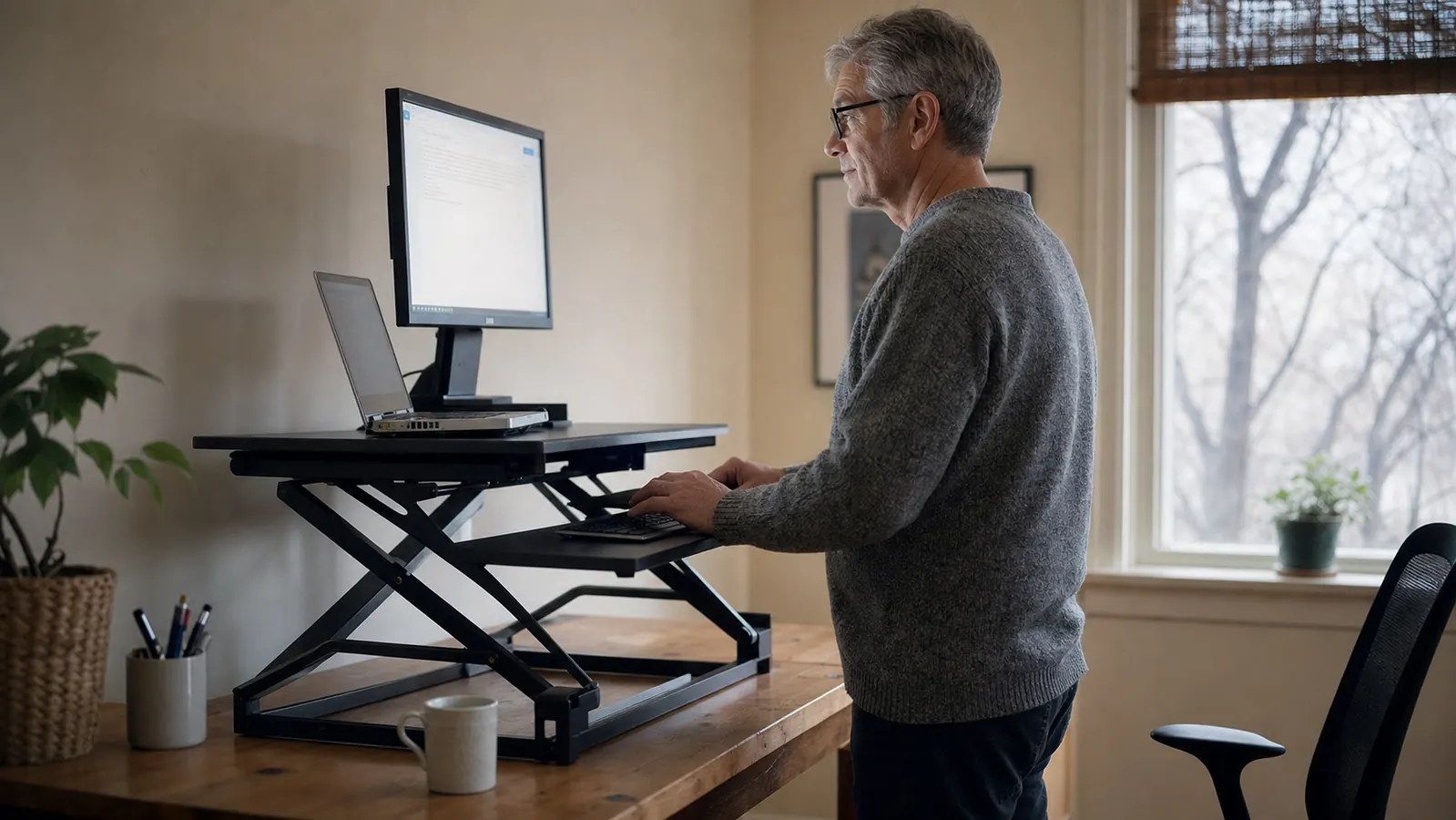
I've worked from a laptop at a kitchen table, a folding TV tray, and eventually a real desk, and for eight of those ten years I never once considered a standing desk converter until my right hip started aching every afternoon around 3pm. I'm forty-four, I sit for a living, and by early this year I was standing up every twenty minutes just to shake out a hip that felt tight no matter how I adjusted my chair. I bought the VIVO 42 inch Desk Converter in February on a Tuesday afternoon after ignoring three coworkers who'd told me the same thing for a year: stop sitting all day.
Six months and roughly 900 hours of desk time later, here's what actually happened, the good and the mildly annoying, because I've read enough Amazon reviews written the week the box arrived to know they don't tell you what month five looks like. This isn't that. At Best Home Office Setup Hub we test the gear we recommend the same way, in an actual home office over months, not a staged photo taken the day it arrived.
The Quick Verdict
A sturdy, genuinely height-adjustable converter that eased my afternoon hip ache within a few weeks and hasn't drifted or sagged since, though the gas spring noise and desk depth requirements aren't for everyone.
Amazon Check Today's Price →If your hip or lower back aches by mid-afternoon, sitting all day might be the actual problem
I ignored that advice for a year before I tried a converter. Check today's price on the VIVO 42 inch Desk Converter and see if it's in stock.
Amazon Check Today's Price on Amazon →How I've Used It
I run a two-person content shop out of a converted bedroom in Richmond, Virginia, and my desk is a 55-inch particleboard IKEA desk, about 29 inches deep, with a 27-inch monitor and a laptop off to the side as a second screen. Before the converter, I sat in a mesh office chair for eight to nine hours a day, five days a week, and I'd stand up maybe four times total, mostly for coffee. My hip started aching around month two of a new client contract that had me on calls from 8am to 4pm most days.
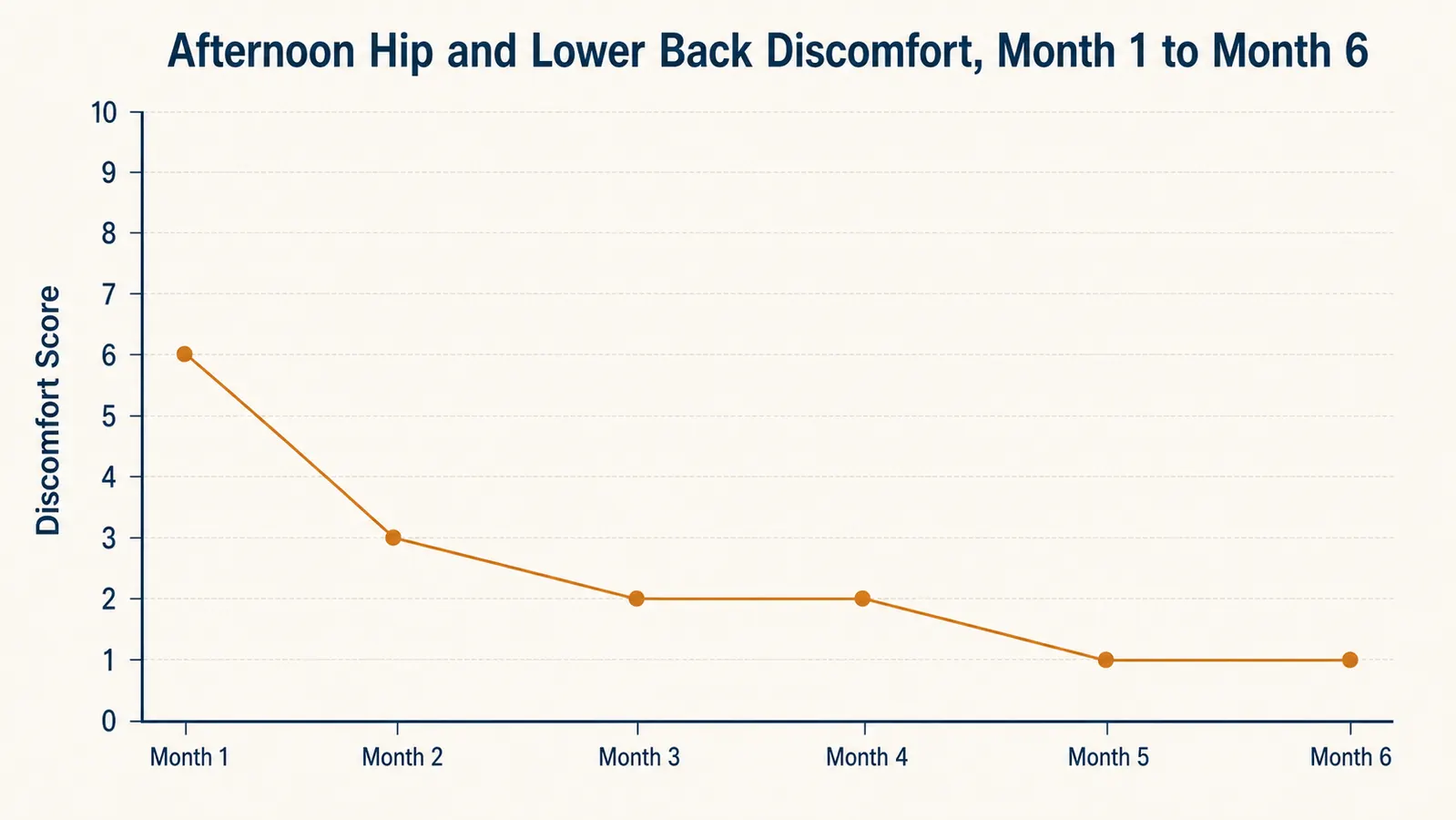
The VIVO K-Series converter sits directly on top of that desk. It's a two-tier platform, 42 inches wide, with a lower keyboard tray that slides forward on its own rails and an upper deck that holds the monitor and, in my case, the laptop riser next to it. I tracked it the same way I've tracked other gear I've reviewed: every Friday I logged a 1 to 10 discomfort score for my hip and lower back at the end of the workday, using a rough scale a physical therapist gave me years ago for an old running injury.
Setup took about twenty-five minutes out of the box, mostly attaching the keyboard tray rails and adjusting the spring tension for my monitor's weight, which the manual walks through with an included hex key. I'm 6 feet tall, 190 pounds, and once I set the tension, the platform held position without drifting, which was the first thing I tested since I'd read complaints about converters that sink an inch every time you let go of the handles.
I'll admit I was skeptical going in. I'd tried a cheaper converter years ago at a friend's office, a single-tier model that wobbled if you typed too hard, and I assumed this would be the same idea with a nicer coat of paint. The first thing that told me otherwise was the box weight. At 33 pounds before you've even attached anything, it doesn't feel like the flimsy version I remembered, and that impression has held up through six months of daily use rather than fading after the first week the way first impressions on desk gear usually do.
The Height Adjustment and Gas Spring, Six Months In
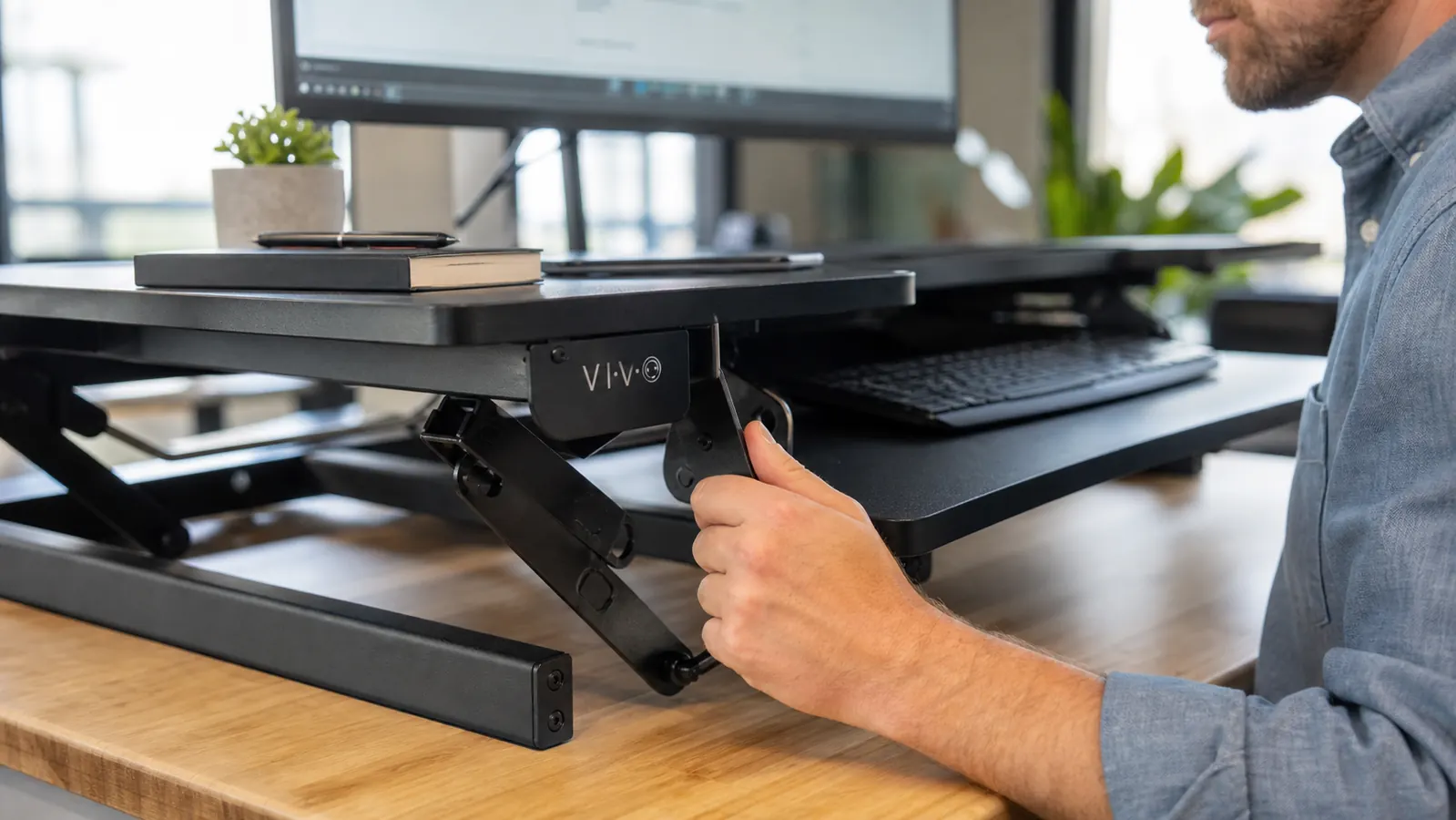
The whole reason to buy a converter over a fixed riser is the up-down motion, and VIVO's version uses a spring-assisted lift with two side handles you squeeze at the same time to unlock it. My height range runs from about 5 inches off the desk at the lowest sitting position to 19.7 inches at full standing height, which at 6 feet tall puts my elbows at roughly a 90-degree angle when I'm typing standing up. That range has stayed identical from day one to month six, no sag, no drift.
The gas spring took getting used to. On the default tension it wanted to fly up faster than I expected the first week, so I dialed it down using the adjustment screw on the back hinge, and after that it settled into a smooth motion that takes about two seconds each direction. I switch positions roughly six to eight times a day now, mostly standing for the first two hours of the morning and again after lunch, sitting through most calls.
The one mechanical thing I've noticed after six months is a faint squeak on the way up that wasn't there in month one. It doesn't affect the lift itself, and a few drops of silicone spray on the hinge quieted it down, but it's the kind of detail a two-week review would never catch.
Dual Monitor Setup and the Keyboard Tray
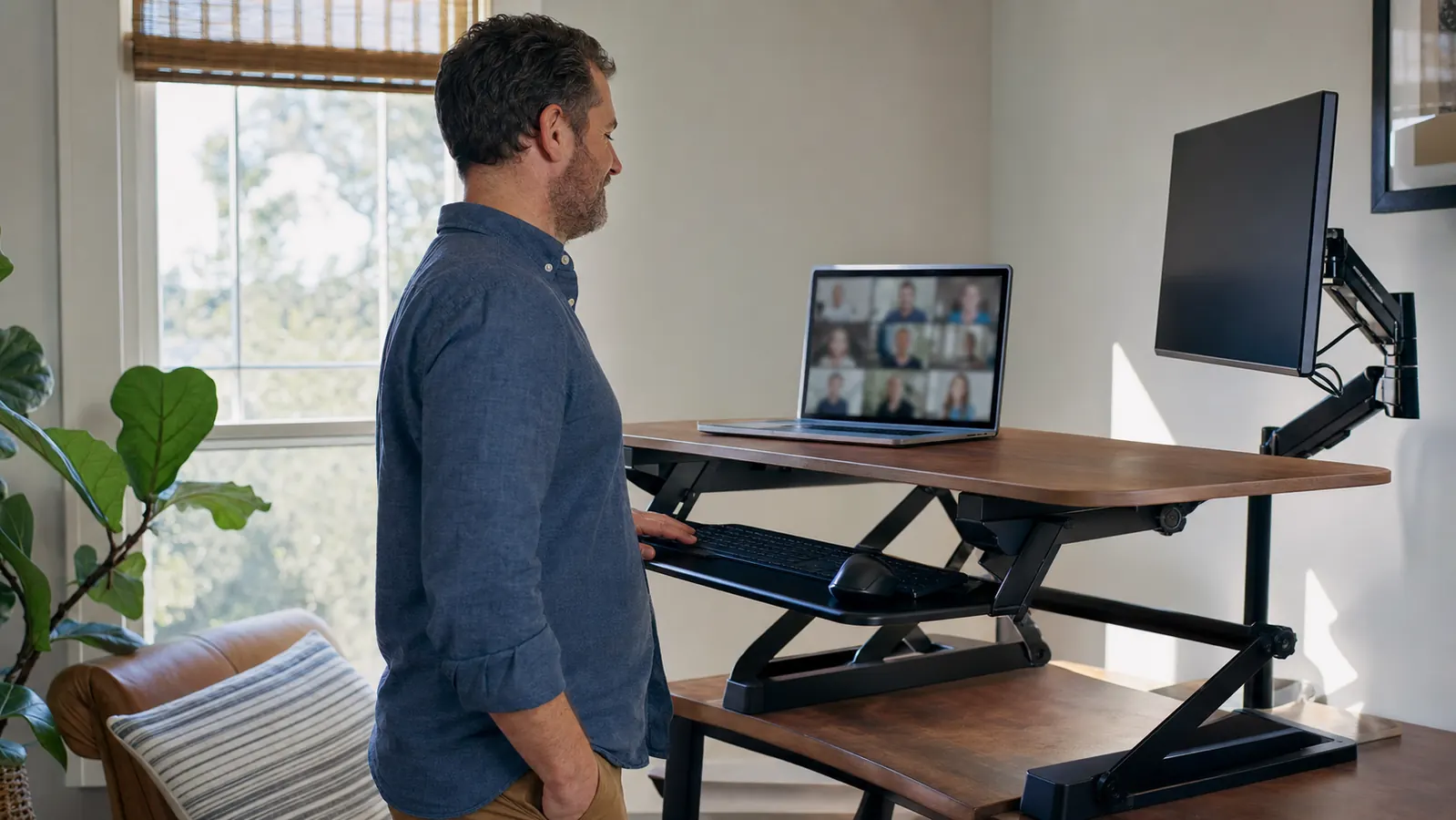
I run a single 27-inch monitor plus a laptop, not the full dual-monitor load the product name advertises, but the upper deck is rated for it and I tested a friend's setup with two 24-inch monitors side by side for a weekend without any tipping or flex. At 42 inches wide it has real room, more than the smaller 32-inch version VIVO also sells, which I'd skip if you run more than one monitor.
The keyboard tray is the part I underestimated going in. It slides independently of the monitor deck, so I can drop it a couple inches lower than the desk surface for a more neutral wrist angle, something my old flat desk setup never let me do. It's deep enough for a full keyboard and a mouse pad, though a keyboard with a numpad pushes right up against the edge of the tray.
Cable management ended up mattering more than I expected once the platform started moving up and down every day. My monitor cable, laptop charger, and a USB hub all have to travel with the deck now instead of staying put, and the first two weeks I had a mess of cords catching on the lift handles every time I raised it. VIVO includes a couple of basic cable clips with the hardware kit, and once I ran everything through those and added a velcro sleeve I already owned, the tangle stopped. It's a ten-minute fix, but it's not optional the way it would be on a fixed desk.
Desk Compatibility and What I'd Check First
My desk is 29 inches deep and the converter's footprint needed about 24 inches of that to sit flush against the wall, which left roughly 5 inches in front for a mug and a notebook, tighter than I expected from the product photos. If your desk is shallower than 28 inches, measure first, because the keyboard tray extends another 4 to 5 inches toward you when it's pulled out.
Weight-wise, the whole unit came in around 33 pounds, and it's not something I'd want to move between rooms often. It's bolted to nothing, it just sits on the desk under its own weight, so it hasn't shifted or walked in six months, but it's also not portable in any real sense once it's positioned.
Six Months In: What's Held Up and What Hasn't
The steel frame and the C-clamp base show zero wobble, even at full standing height with my monitor and laptop both loaded on the upper deck. The matte black finish has a couple of light scuff marks near the keyboard tray rails from where my wrist rests, but nothing that looks like it's wearing through.
The keyboard tray rails are the one part I'd flag for anyone buying secondhand or planning to use this for years. Mine still glide smoothly, but I've read enough owner threads to know the nylon rollers on some units wear unevenly after a year or two of daily sliding. Six months in, mine's fine, but it's the part I'm watching most closely.
Where It Falls Short
It's not silent. That squeak I mentioned is minor, but the height adjustment handles themselves make a mechanical clunk when you release them, loud enough that my partner asked about it during a call in the next room. It's not a dealbreaker, but if you're on video calls constantly, time your height changes for before the call starts rather than mid-sentence.
It also eats more desk depth than the marketing photos make obvious, and at 33 pounds it's a two-person carry if you're moving offices. At just under its current listed price, it's not the cheapest converter on the market either, there are single-tier options for roughly half that, they just don't have the independent keyboard tray, which for me was the actual reason my wrists stopped hurting along with my hip.
What I Considered Instead
Before I bought this one, I looked hard at a full electric standing desk, the kind with motorized legs that replace the whole desk instead of sitting on top of it. Those start around $400 for anything sturdy, and I would have had to get rid of a desk I actually like, a solid particleboard IKEA piece that's held up for six years. The converter let me keep the desk and spend less than half of what an electric desk would have cost.
I also tried a single-tier riser for about a week, borrowed from a coworker, before committing to the two-tier VIVO. The single-tier version puts the keyboard and monitor on the same fixed plane, which meant my wrists were still angled up the way they'd been on the flat desk. That was the deciding factor for me, not the height range, not the brand, just the fact that a separate keyboard tray was the only version that actually changed how my wrists felt by the end of a workday.
What I Liked
- Height range and lift held perfectly steady across six months of daily use, no sag
- Independent keyboard tray genuinely improved wrist angle, not a marketing bullet point
- 42-inch platform comfortably handled a monitor and laptop side by side
- Steel C-clamp base shows zero wobble even at full standing height
- Gas spring tension is adjustable once you find the screw on the back hinge
Where It Falls Short
- Eats more desk depth than the photos suggest, measure first if your desk is under 28 inches
- Height adjustment handles release with an audible mechanical clunk
- Faint squeak developed by month four, fixed with silicone spray but shouldn't need it
- At 33 pounds it's not something you'll want to relocate often
I didn't buy this to look productive on camera. I bought it because my hip hurt by 3pm every day, and six months later it doesn't.
Who This Is For
This makes sense for anyone who sits most of the day and has started noticing it in a specific spot, a hip, a lower back, a neck, the way I did. It's also a good fit if you already like your desk and don't want to replace it with a full electric standing desk, since this sits on top of what you have. If you run a single monitor or a monitor-plus-laptop setup and your desk is at least 28 inches deep, it should work well. I'd also point it at anyone who works from a laptop most of the day, since raising the laptop to eye level alongside a monitor cuts down on the neck-down posture that laptops force on their own.
Who Should Skip It
If your desk is shallow, sits on a rolling cart, or is already crowded with a printer or a second screen, the footprint will feel tight fast. If you're on video calls back to back all day, test the handle clunk in person or check the return policy first. And if you genuinely want the full electric standing desk experience, a converter is a compromise, not a replacement, it just happens to be a much cheaper one. And if $162 feels like too much for what's essentially a platform on springs, that's a fair read, plenty of people do fine with a cheaper single-tier riser, they just won't get the independent keyboard tray that made the difference for me.
Six months of daily use later, my hip stopped aching and the desk I already own still works
I didn't need to replace my whole desk to fix this. Check today's price on the VIVO 42 inch Desk Converter and see if it's in stock in your size.
Amazon Check Today's Price on Amazon →